Low-poly 3D models for mobile games: budgets, draw calls and tricks that keep 60 fps
How to build low-poly 3D assets for iOS and Android games: triangle budgets per asset type, texture atlases, draw calls, LODs, baked lighting and the optimisation tricks professional mobile artists use.
Short answer: on mobile, performance is decided less by any single model's triangle count and more by draw calls, texture memory and overdraw. A good low-poly asset spends triangles only on the silhouette, shares a texture atlas with its neighbours and has LODs if it can be seen from far away.
Starting budgets per asset type (mid-range phones)
| Asset | Triangles | Texture |
|---|---|---|
| Small prop (cup, bottle, coin) | 50–300 | Shared atlas |
| Medium prop (chair, crate, barrel) | 200–1,000 | Shared atlas |
| Hero prop / weapon | 1–3k | 512–1024 |
| Building / large set piece | 1–5k | Atlas or trim sheet |
| Hero character | 3–8k | 1024 atlas (details) |
The five things that actually cost performance
- Draw calls. Every unique material on screen is (at least) one draw call. Atlases and shared materials matter more than shaving 200 triangles.
- Texture memory. Use ASTC compression, mipmaps, and the smallest size that still looks right at game distance.
- Overdraw. Transparent leaves, particles and glass drawn on top of each other are expensive. Use alpha-tested cards sparingly and keep particles small.
- Real-time lights and shadows. Bake lighting into lightmaps or vertex colours where the scene is static.
- Skinned meshes. Animated characters cost more than static props; limit bone influences (often 2 on mobile).
Modelling tricks we use
- Silhouette-first topology. Triangles go where the outline changes; flat faces stay flat.
- Normal maps for small detail — bolts, seams and panel lines are baked from a high-poly version, not modelled.
- Trim sheets for buildings and hard-surface kits: one texture, many assets. See hard-surface prop modelling.
- Vertex colour for tinting variations without new textures.
- Remove hidden faces — the bottom of a crate that sits on the floor is never seen.
- Merge static props that always appear together into one mesh and one material.
LODs and culling
Two or three LOD levels (100% / ~50% / ~20%) plus sensible cull distances usually give the biggest gain in open scenes. We deliver LODs named for your engine (_LOD0, _LOD1…) and simple collision meshes (UCX_ for Unreal) when requested.
Checking the result
A model is only optimised when it is checked in the engine, on the weakest target device, with the profiler open. We test at game camera distance and share frame-time notes along with the files. The full pre-delivery list is in the game-ready 3D asset checklist.
Working with us
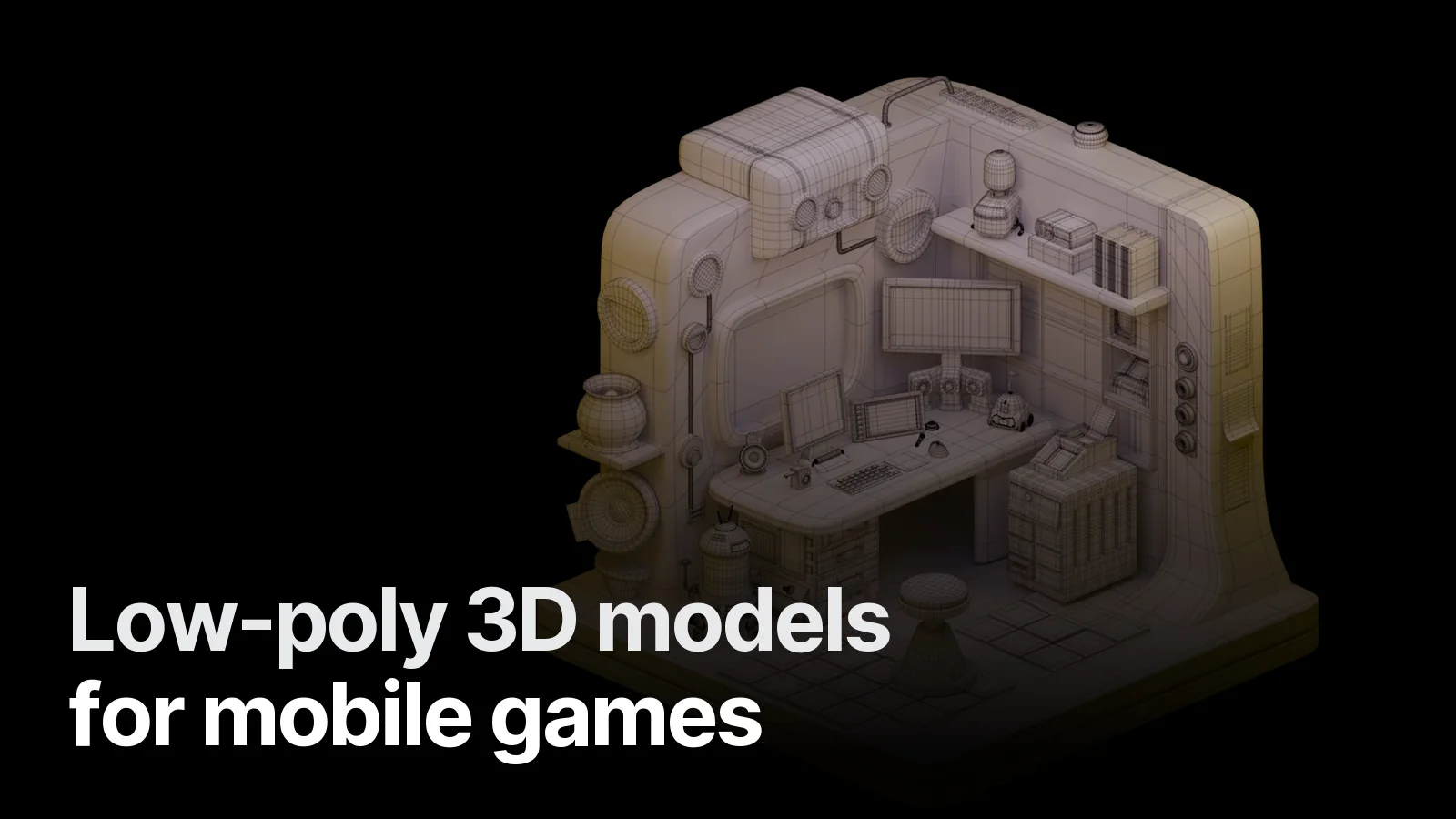
Our Isometric Sci-Fi Room is an example of a game-optimised environment with its wireframe visible. We build low-poly and optimised assets for Unity, Unreal and Godot mobile projects — see the Game & 3D page or send your asset list and target device on WhatsApp.
Frequently asked
1.How many triangles can a mobile game scene have?
As a rough 2026 target for mid-range phones: 100–300k visible triangles per frame, with draw calls kept under about 100–150. The exact number depends on shaders, lighting, resolution and how many skinned characters are animating.
2.What is a texture atlas and why does it help?
A texture atlas packs the textures of many objects into one image so they can share one material. Fewer materials means fewer draw calls, which is often the biggest performance win on mobile.
3.Do mobile games need LODs?
For anything that is seen both close and far — yes. Two or three LOD levels (for example 100%, 50%, 20% of the triangles) cut the triangle count on screen with no visible difference at distance.
4.Is low-poly the same as a low-poly art style?
No. Low-poly as an art style is a deliberate faceted look. Low-poly as optimisation means any style — stylised or realistic — built with as few triangles as the silhouette needs.